
 MCP Service
RuleGo-Server supports MCP (Model Context Protocol). When enabled, the system automatically registers management APIs as MCP tools. Components and rule chains can be exposed on demand through group configuration, enabling AI assistants (Claude Code, Cursor, Windsurf, etc.) to directly operate rule chains and invoke components.
# What is MCP
MCP is a standardized protocol that provides AI with context-aware capabilities for application systems, going beyond code completion or Q&A. MCP acts like a USB-C interface — providing AI with a standardized way to connect to data sources and tools.
# Configuration
[mcp]
# Whether to enable MCP service
enable = true
2
3
# User Configuration
Using MCP requires configuring an apiKey for the user:
[users]
admin = admin,ak-your-api-key
user01 = user01,ak-another-user-key
2
3
# MCP Endpoints
# Default Endpoint (All Tools)
http://{host}:{port}/api/v1/mcp/{apiKey}
# Group Endpoint (Tool Subset)
http://{host}:{port}/api/v1/mcp/{apiKey}/group/{groupName}
After successful startup, the console prints the MCP address:
RuleGo-Server mcp server running at http://127.0.0.1:9090/api/v1/mcp/ak-xxx
# Authentication Methods
The MCP endpoint supports three authentication methods (in priority order):
| Method | Format |
|---|---|
| URL Path Parameter | /api/v1/mcp/{apiKey} |
| Authorization Header | Authorization: Bearer {apiKey} |
| X-API-Key Header | X-API-Key: {apiKey} |
# Tool Types
The MCP default endpoint registers management API tools. Component and rule chain tools are exposed through group configuration.
# 1. Management API Tools (Default Endpoint)
| Tool Name | Function | Required Parameters |
|---|---|---|
list_rule_chains | List/search rule chains | None (optional keywords, root, disabled, page, size) |
get_rule_chain | Get rule chain definition | id |
preview_rule_chain | Preview rule chain (without saving) | id, body |
save_rule_chain | Create/update rule chain | id, body |
delete_rule_chain | Delete rule chain | id |
operate_rule_chain | Deploy/stop rule chain | id, action (deploy/undeploy) |
execute_rule_chain | Execute rule chain | id, message |
list_components | List available components | None (optional category) |
get_component_doc | Get component documentation | type (optional types array for batch query) |
list_node_pool | List shared node pool | None |
# 2. Component Tools (Exposed via Groups)
Register RuleGo components as MCP tools through group configuration. The tool name is the component type name.
Parameters are automatically generated from the component's form definition (ComponentForm.Fields), including name, type, description, default value, and whether required.
Example: Call the restApiCall component to make HTTP requests, or the dbClient component to query databases.
# 3. Rule Chain Tools (Exposed via Groups)
Register deployed rule chains as MCP tools through group configuration. The tool name is the rule chain ID.
Parameter sources (in priority order):
- Rule chain's
additionalInfo.inputSchema - DSL template variable resolution
- Default
inMessageobject parameter
Changes to rule chain tools are synchronized in real time (create, update, delete automatically reflected in the tool list).
# Group Control
Configure tool groups via [mcp.groups] to implement permission control. Component and rule chain tools are only exposed through group endpoints.
[mcp.groups]
# Read-only group: only includes view operations from management tools and component documentation
readonly = rules,list_components,get_component_doc

# Full access
full = *

# No delete
no-delete = *,-delete_rule_chain
2
3
4
5
6
7
8
9
Group syntax:
*: Include all tools-prefix*: Exclude tools matching the prefix (e.g.,-delete_*)- Exact tool name: Include only the specified tool
rules: Include all management API toolscomponents: Include all component toolschains: Include all rule chain tools
Each user has a default group by default that includes all tools.
# Connecting AI Clients
# Claude Code
Edit ~/.claude/settings.json:
{
  "mcpServers": {
    "rulego": {
      "type": "streamableHttp",
      "url": "http://localhost:9090/api/v1/mcp/ak-your-secret-key"
    }
  }
}
2
3
4
5
6
7
8
For detailed usage examples, see AI Features.
# Cursor
Add to the MCP configuration in Cursor settings:
{
  "mcpServers": {
    "rulego": {
      "url": "http://localhost:9090/api/v1/mcp/ak-your-secret-key"
    }
  }
}
2
3
4
5
6
7
# Trae
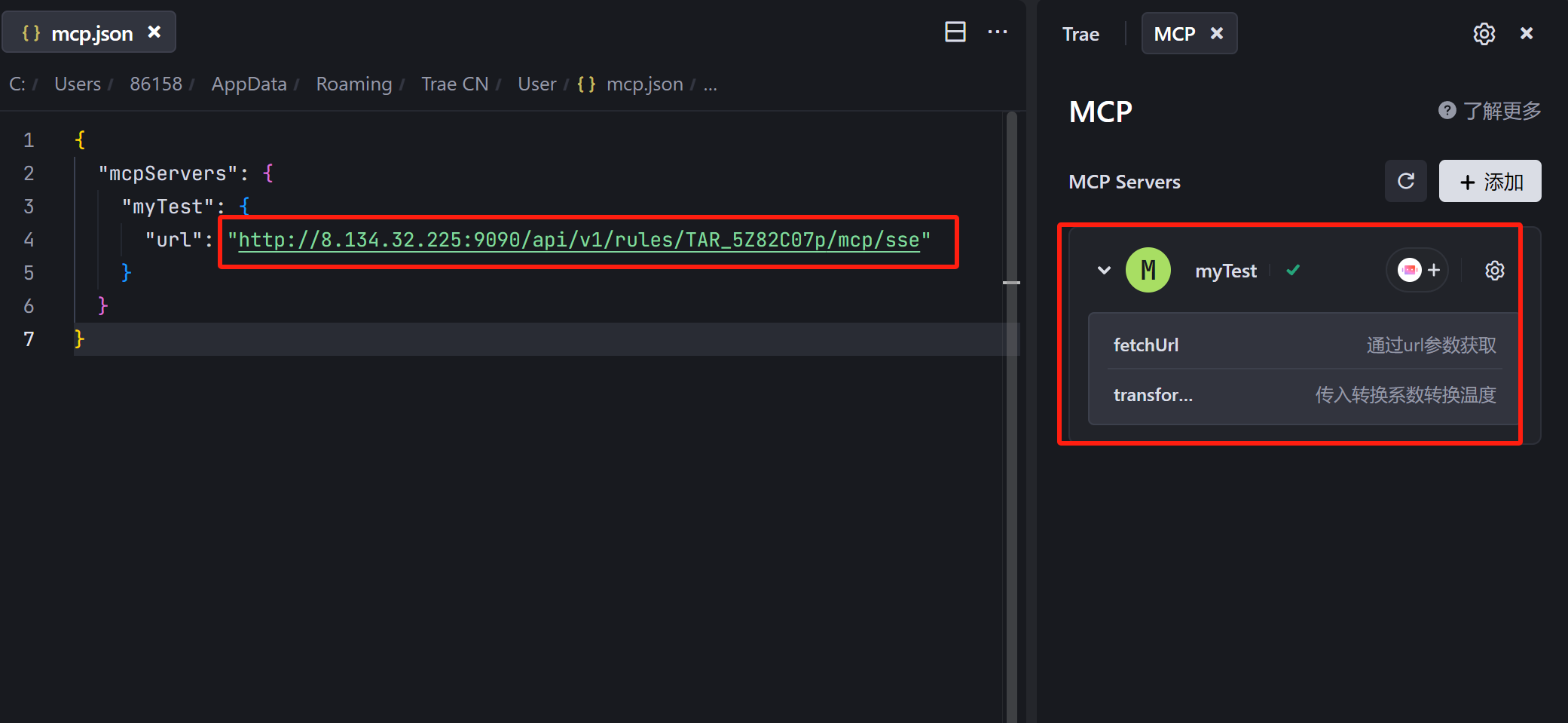
Add in Trae's MCP settings (Builder > MCP > Add):
{
  "mcpServers": {
    "rulego": {
      "type": "streamableHttp",
      "url": "http://localhost:9090/api/v1/mcp/ak-your-secret-key"
    }
  }
}
2
3
4
5
6
7
8
# Cherry Studio
- Open Cherry Studio Settings -> "MCP Servers"
- Click "Add Server"
- Fill in:
- Name:
rulego-server - Type:
StreamableHTTP - URL:
http://127.0.0.1:9090/api/v1/mcp/ak-your-secret-key
- Name:
# Creating Custom MCP Endpoints via the Editor
In addition to the system-level MCP service, you can create independent MCP Server endpoints through rule chains. One rule chain is one MCP server; all tool configuration and processing logic is completed within the rule chain, supporting real-time updates.
Use cases: Need fine-grained control over tool sets, independently deploy MCP endpoints, or provide different tool sets for different AI clients.
# Steps
- Open RuleGo-Editor, create a new rule chain, and drag the [MCP Server] node onto the canvas
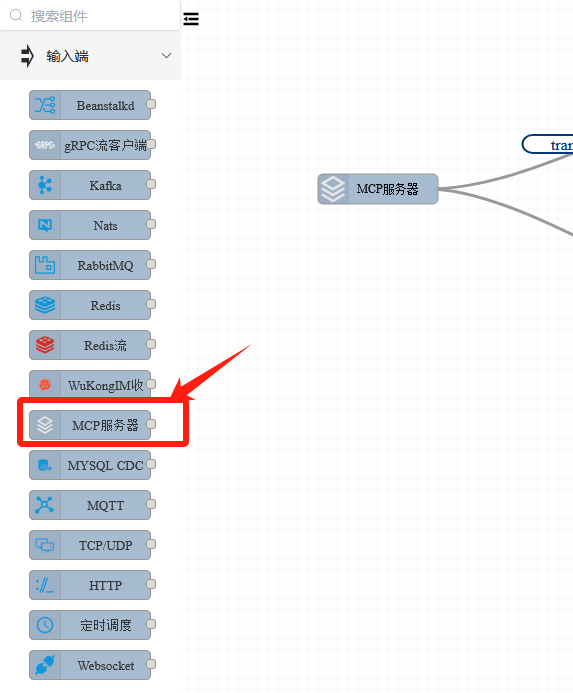
- Configure the server port (can reuse the default HTTP server port
ref://:9090)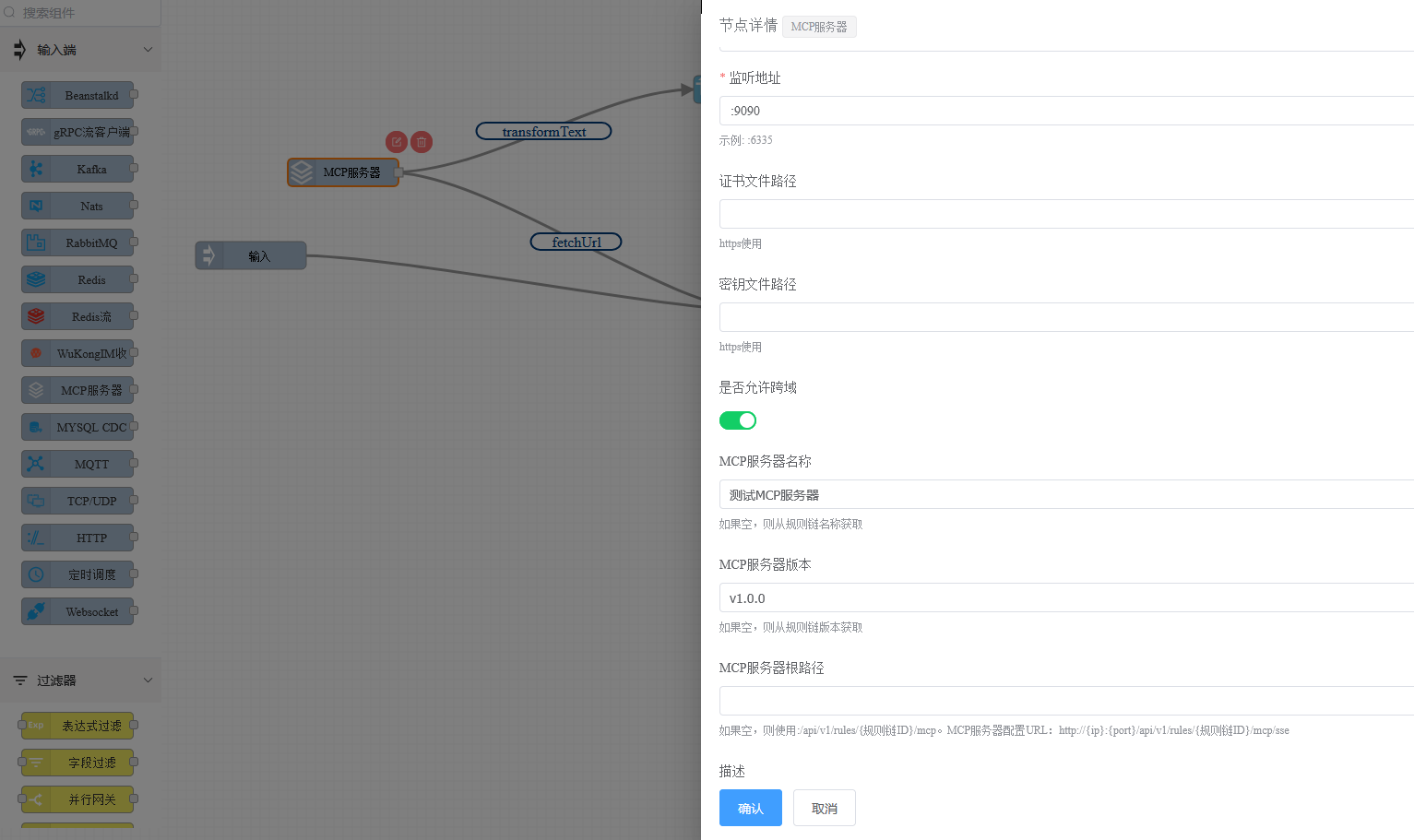
- Configure route settings; each route represents an MCP tool
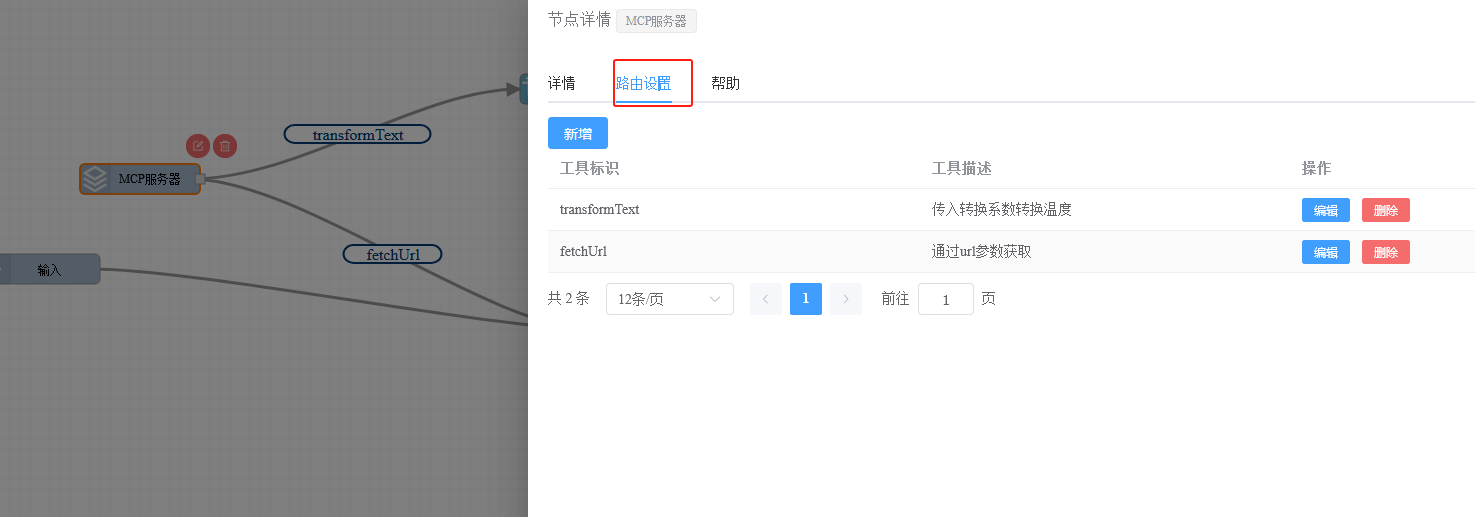
- Click the [Add] button to configure the tool identifier, description, and input JsonSchema
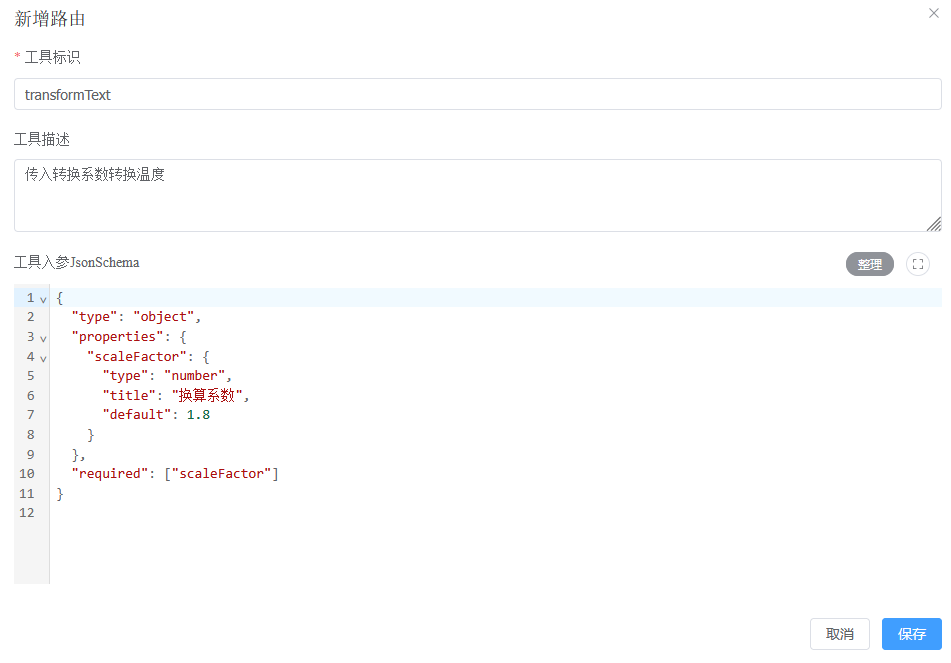
- Drag the tool implementation logic node onto the canvas, and connect the tool identifier to the processing node

- Copy the MCP SSE address from [Settings] - [Integration] for client testing
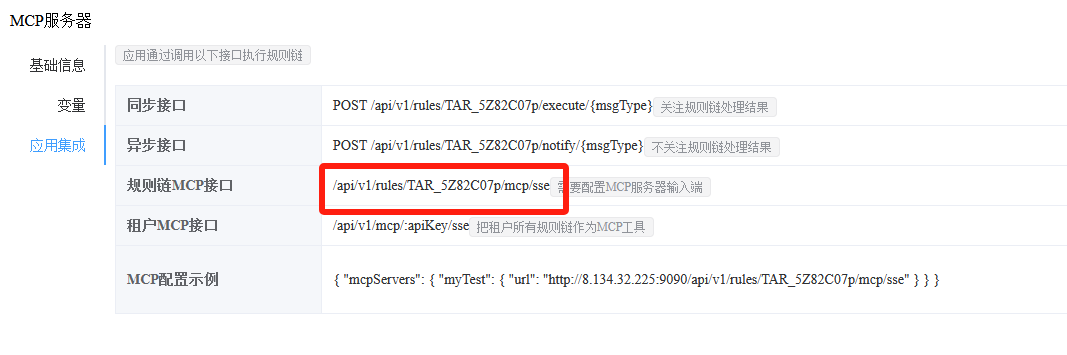
- Configure this address in your AI client to start using it
# Example: Temperature Conversion Tool
{
  "ruleChain": {
    "id": "temp-converter",
    "name": "Temperature Conversion MCP Service",
    "root": true
  },
  "metadata": {
    "endpoints": [{
      "id": "ep1",
      "type": "endpoint/mcpServer",
      "name": "MCP Server",
      "configuration": {
        "allowCors": true,
        "name": "Temperature Conversion Service",
        "server": "ref://:9090",
        "version": "v1.0.0"
      },
      "routers": [{
        "id": "r1",
        "params": ["Pass in conversion factor to convert temperature", "{\"type\":\"object\",\"properties\":{\"scaleFactor\":{\"type\":\"number\",\"title\":\"Conversion Factor\",\"default\":1.8}},\"required\":[\"scaleFactor\"]}"],
        "from": {"path": "transformText"},
        "to": {"path": "temp-converter:node_js"}
      }]
    }],
    "nodes": [{
      "id": "node_js",
      "type": "jsTransform",
      "name": "Convert Temperature",
      "configuration": {
        "jsScript": "var newMsg=msg||{}; newMsg.value=msg.from||'test01'; return {'msg':newMsg,'metadata':metadata,'msgType':msgType};"
      }
    }],
    "connections": []
  }
}
2
3
4
5
6
7
8
9
10
11
12
13
14
15
16
17
18
19
20
21
22
23
24
25
26
27
28
29
30
31
32
33
34
35
For more component configuration details, see the MCP Server component documentation.
# Core Value
- Enhance AI's Understanding of Business Logic: AI deeply understands business processes through rule chain tools
- Intelligent Automated Decision-Making: AI obtains real-time data and makes decisions based on rules
- Expand Agent Boundaries: Infinitely extend AI capabilities through components and rule chains
- Cross-System Integration: RuleGo-Server serves as a middleware layer to encapsulate data sources and tools
- New Paradigm for Application Interaction: Business systems are quickly encapsulated as MCP tools, bridging the last mile between AI and applications