
 MQTT Endpoint
Mqtt Endpoint 用来创建和启动MQTT接收服务,它可以订阅不同主题数据,然后路由到不同规则链进行处理。
# Type
endpoint/mqtt
# 启动配置
该组件允许通关过server字段复用共享的连接客户端。参考组件连接复用 。
| 字段 | 类型 | 是否必填 | 说明 | 默认值 |
|---|---|---|---|---|
| server | string | 是 | mqtt broker地址 | - |
| username | string | 否 | 用户名 | 0 |
| password | string | 否 | 密码 | - |
| qOS | int | 否 | QOS | 0 |
| cleanSession | bool | 否 | CleanSession | false |
| clientID | string | 否 | 客户端ID | 默认随机数 |
| cAFile | string | 否 | CA文件路径 | - |
| certFile | string | 否 | Cert文件路径 | - |
| certKeyFile | string | 否 | CertKey文件路径 | - |
# 响应
exchange.Out.SetBody响应之前,需要通过exchange.Out.Headers()或者exchange.Out.Msg.Metadata指定responseTopic参数,组件就会往指定的主题发送数据:
exchange.Out.GetMsg().Metadata.PutValue("responseTopic", "device.msg.response")
// or
exchange.Out.Headers().Add("responseTopic", "device.msg.response")

exchange.Out.SetBody([]byte("ok"))
1
2
3
4
5
2
3
4
5
响应参数配置:
| 字段 | 类型 | 是否必填 | 说明 | 默认值 |
|---|---|---|---|---|
| responseTopic | string | 是 | 响应主题 | - |
| responseQos | int | 否 | 响应QOS | 0 |
# 示例
以下是使用endpoint的示例代码:
- RestEndpoint (opens new window)
- WebsocketEndpoint (opens new window)
- MqttEndpoint (opens new window)
- ScheduleEndpoint (opens new window)
- NetEndpoint (opens new window)
- KafkaEndpoint (opens new window) (扩展组件库)
# 注意事项:主题重叠(Topic Overlap)与重复消息
在部分 MQTT Broker(例如 EMQX)中,如果同一个客户端同时订阅了存在重叠关系的主题模式,匹配到同一条消息时,Broker 会针对每个订阅分别投递一次,导致客户端收到重复数据。典型示例:
- /sys/msg/a/+
- /sys/msg/+/+
上述两个订阅的匹配范围存在交集,当消息主题命中交集部分时,同一条消息会被投递两次(或多次,取决于订阅数量)。在使用 Mqtt Endpoint 路由到规则链处理时,需要考虑去重或避免重叠订阅。
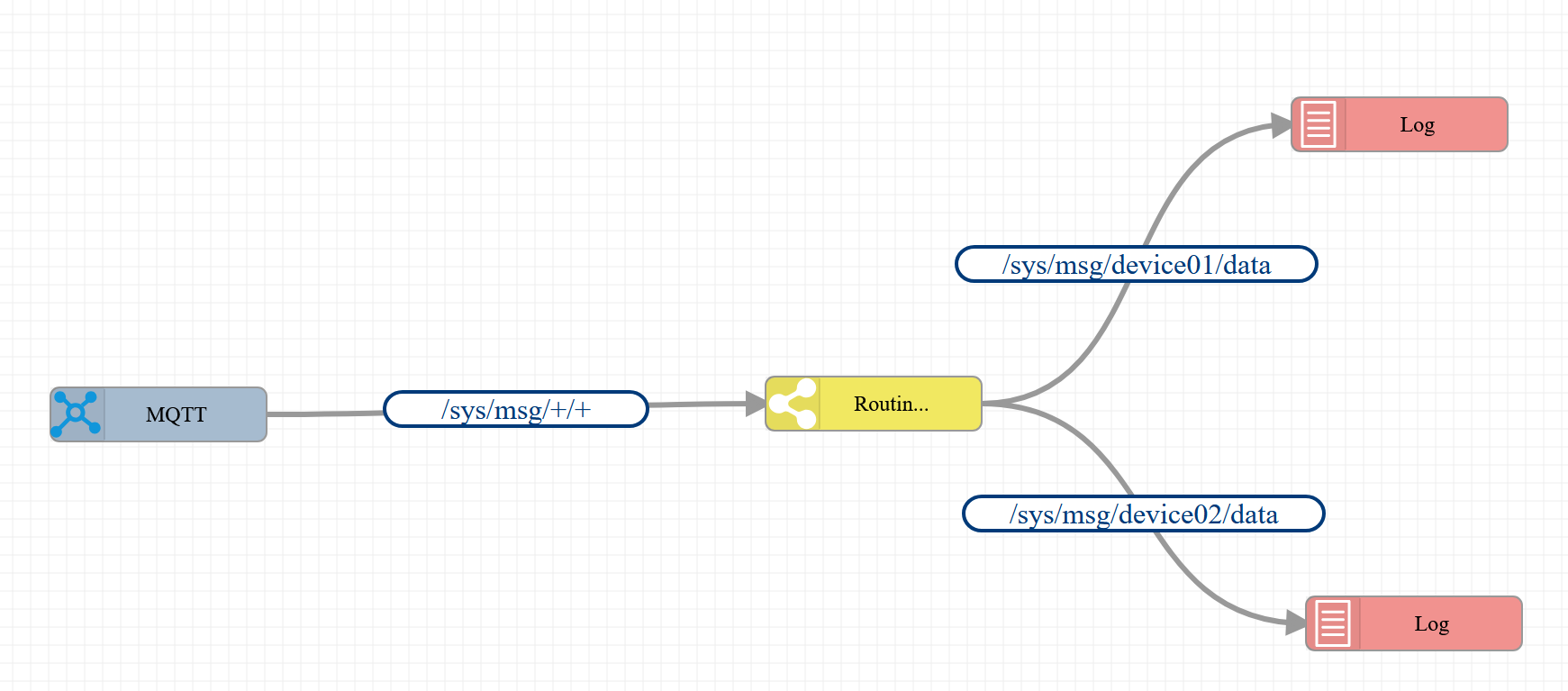
建议:通过只订阅一个最大覆盖的主题,然后通过节点进行路由分发,例如:通过msgType(msgType=topic)或者 metadata.topic 进行分发。或者js脚本进行复杂的分发处理。
1)分发方案A:通过 msgTypeSwitch 组件使用 msgType 匹配分发
{
	"ruleChain": {
		"id": "tgimYPt5L06J",
		"name": "test",
		"root": true,
		"debugMode": true,
		"additionalInfo": {
			"description": "",
			"noDefaultInput": false,
			"layoutX": "306",
			"layoutY": "285"
		},
		"configuration": {}
	},
	"metadata": {
		"endpoints": [
			{
				"id": "node_1",
				"type": "endpoint/mqtt",
				"name": "MQTT",
				"configuration": {
					"clientID": "test5888",
					"maxReconnectInterval": 0,
					"password": "nc_admin",
					"qOS": 0,
					"server": "192.168.62.20:1883",
					"username": "nc_admin"
				},
				"debugMode": false,
				"additionalInfo": {
					"layoutX": 351,
					"layoutY": 132
				},
				"routers": [
					{
						"id": "m62quFtZlMMZ",
						"params": [],
						"from": {
							"path": "/sys/msg/+/+",
							"configuration": null,
							"processors": []
						},
						"to": {
							"path": "tgimYPt5L06J:node_3",
							"configuration": null,
							"wait": false,
							"processors": []
						}
					}
				]
			}
		],
		"nodes": [
			{
				"id": "node_6",
				"type": "log",
				"name": "日志",
				"configuration": {
					"jsScript": "return 'Incoming message:\\n' + JSON.stringify(msg) + '\\nIncoming metadata:\\n' + JSON.stringify(metadata);"
				},
				"debugMode": false,
				"additionalInfo": {
					"layoutX": 1048,
					"layoutY": 248
				}
			},
			{
				"id": "node_5",
				"type": "log",
				"name": "日志",
				"configuration": {
					"jsScript": "return 'Incoming message:\\n' + JSON.stringify(msg) + '\\nIncoming metadata:\\n' + JSON.stringify(metadata);"
				},
				"debugMode": false,
				"additionalInfo": {
					"layoutX": 1040,
					"layoutY": -29
				}
			},
			{
				"type": "msgTypeSwitch",
				"debugMode": false,
				"id": "node_3",
				"name": "消息路由",
				"additionalInfo": {
					"layoutX": 748,
					"layoutY": 126
				}
			}
		],
		"connections": [
			{
				"fromId": "node_3",
				"toId": "node_5",
				"type": "/sys/msg/device01/data"
			},
			{
				"fromId": "node_3",
				"toId": "node_6",
				"type": "/sys/msg/device02/data"
			}
		]
	}
}
1
2
3
4
5
6
7
8
9
10
11
12
13
14
15
16
17
18
19
20
21
22
23
24
25
26
27
28
29
30
31
32
33
34
35
36
37
38
39
40
41
42
43
44
45
46
47
48
49
50
51
52
53
54
55
56
57
58
59
60
61
62
63
64
65
66
67
68
69
70
71
72
73
74
75
76
77
78
79
80
81
82
83
84
85
86
87
88
89
90
91
92
93
94
95
96
97
98
99
100
101
102
103
104
2
3
4
5
6
7
8
9
10
11
12
13
14
15
16
17
18
19
20
21
22
23
24
25
26
27
28
29
30
31
32
33
34
35
36
37
38
39
40
41
42
43
44
45
46
47
48
49
50
51
52
53
54
55
56
57
58
59
60
61
62
63
64
65
66
67
68
69
70
71
72
73
74
75
76
77
78
79
80
81
82
83
84
85
86
87
88
89
90
91
92
93
94
95
96
97
98
99
100
101
102
103
104
在 GitHub 上编辑此页 (opens new window)
上次更新: 2026/01/07, 01:45:04